What is new, improved, and fixed in each release. One purchase includes free updates to this version.
Kronos 3 Editor
v1.12.1
9 October 2026
Due to popular demand, Kronos 3 Editor comes to Windows, as an early access release. Nothing changes in the Mac version.
What changed
A Windows version: a VST3 plug-in and a standalone app, 64-bit, for Windows 10 and 11. The same editor, the same licence and the same 7 day trial. One installer puts the plug-in where your DAW looks for it and the app in the Start menu.
On Windows, parameter names are shown in full by default. Each name sits on its own line above its control. To go back to the compact layout, untick Show full parameter names under ⓘ, Settings. The Mac default has not changed.
Good to know
It is early access. So far it has been tested on a Windows 11 virtual PC running on a Mac, with a Kronos 3, as the standalone app and as a VST3 in REAPER, and it works. Other DAWs, Windows 10 and Korg's own USB-MIDI driver have not been tested yet. If something misbehaves, tell me and I will fix it.
Getting past the Windows warning. The installer is not code-signed yet, so Windows may show a blue window headed "Windows protected your PC". Click More info, then Run anyway. If your browser asks whether to keep the downloaded file, choose Keep.
If the plug-in cannot find the Kronos in your DAW, switch the Kronos off in the DAW's own MIDI device settings and try again. Windows often lets only one program use a MIDI port at a time. The standalone app is not affected.
If the Kronos's own keys are silent, turn Local Control on in the Kronos's Global mode, MIDI page.
A PC counts as one of the two devices on your licence.
Three librarian tools in the Prog/Combi browser, all asked for by a customer: see which combinations use a program, rename a sound where it sits, and initialise slots. Thank you to customers MH and YB for the feedback that helped drive these improvements.
The browser after Where used has read every combination bank. Each mark is the number of combinations that play that program; click one for the list.
What changed
See which combinations use a program. Where used reads every combination once and marks each program in the browser with how many combinations play it. Click a mark for the list, with the timbres in each. Timbres that are muted are counted apart, because factory combinations park their unused timbres on a default program and those are not really "using" it. If a bank has not been read the counts say so with a plus (×3+).
Rename a program or combination in the browser. Select…, tick one sound, Rename…. Only the name is written; everything that uses the slot is unaffected.
Initialise slots. Select…, tick any number of sounds, Initialise… replaces them with the Kronos's own Init Program or Init Combi. Before you confirm, the window lists every slot and names any program that combinations play. Factory (INT) slots are only included when you tick the box for them.
Good to know
Where used covers combinations. Set lists and sequencer songs can also point at a program and are not checked; the browser says so wherever it shows a count.
Initialise erases the sounds you tick and cannot be undone from the editor. Save them first if you might want them back.
In an EXi bank, Initialise copies an Init Program the editor has seen in an EXi bank on your Kronos. If it has not seen one it tells you, and writes nothing.
Two requests from customers: put sounds back exactly where they came from, and show parameter names in full.
Back to where they came from
Write loaded files back to their original locations. Write all to bank… could only lay patches out over consecutive slots of one bank. It now has a second mode, Original locations, which sends each ticked file back to the bank and slot in its name (INT-D 045 - SynthBrass.syx goes to INT-D 045), across as many banks as it takes. It is the way to restore tweaked factory programs, or edited sounds scattered through several banks, that your combinations expect to find at their usual addresses. You see every slot and what it holds now before anything is sent.
It will not guess. A file with no address, two files from the same slot, a bank that cannot be written, and a program of the wrong type for its bank are each listed with the reason and left unwritten, never placed somewhere else. Factory (INT) banks are only written when you tick the box that says so.
The write window warns about the wrong bank type before the write. In the new mode an EXi program headed for an HD-1 bank (or the reverse) is flagged in the review, instead of being refused by the Kronos one slot at a time.
Full parameter names, and a shortcut in Flow
Show full parameter names switched on (it is off by default): an AL-1 program's OSC1, OSC2 and Sub OSC in Flow, every name on its own line above its control.
Show full parameter names. A new setting under ⓘ, Settings puts each parameter's name on its own line above its control, so long names are no longer cut short. It is off by default: pages get taller with it on.
The Flow view's stage caption is a shortcut. On AL-1 and the other EXi engines the line beside a stage's name lists what it holds (OSC1 · OSC2 · Sub OSC · Ring Modulator · Noise Generator). Click a name to open all parameters at that group.
Good to know
Original locations needs the separate .syx files a folder save writes. One combined file carries no addresses, so the mode is switched off for it.
Pressing Stop during a write keeps and saves the slots already written and leaves the rest untouched. The guide used to say the bank was left exactly as it was, which was not true of the slots already done.
v1.10.3
8 October 2026
A fix for the Flow view on AL-1 and MOD-7 programs. Thank you to the customer who reported it.
Fixes
Oscillator 2 was missing from the Flow view on AL-1 programs. Opening all parameters on the OSC stage showed OSC1, the sub oscillator, the ring modulator and the noise generator, but not OSC2, and the PITCH stage left out OSC2 Pitch. They could only be reached by switching to the Classic view. All of AL-1's oscillator settings are now in Flow, and so is MOD-7's OSC2, which was hidden the same way.
The OSC stage is described correctly on every engine. It used to read "Oscillator 1, multisample" whatever the engine. On AL-1 it now lists what the stage holds: OSC1, OSC2, Sub OSC, Ring Modulator, Noise Generator.
v1.10.2
6 October 2026
Two fixes for things that got in the way of playing: notes that stayed on, and MIDI the plugin handed back to your DAW that it should have kept.
Stuck notes
An All notes off button. It sits in the strip at the bottom of the window and sends All Sound Off and All Notes Off on every channel, for a stuck note whatever its cause.
An optional guard when the editor reloads a sound. A note sounding while the editor reloads the Kronos's edit buffer (after an effects, KARMA or Drum Track edit, a preview, or loading a .syx) can, on some units, be left hanging. The info page's Settings now has Silence held notes before the editor reloads a sound. It is off by default, so the Kronos's own behaviour, held notes ringing through a change, is left alone. Selecting a program or combination is never silenced: Smooth Sound Transitions work as they always have.
The on-screen keyboards always release their note. On any pointer up, anywhere, and when the window loses focus, so dragging off a key or into another window can no longer leave a note held.
In a DAW
The plugin hands back only notes, controllers and the like. When the Kronos is a track's MIDI input, the DAW also feeds the plugin the Kronos's SysEx replies to the editor and its MIDI clock, and the plugin used to pass all of that back out as its MIDI output. It now passes only channel voice messages, so a MIDI FX slot still plays its instrument but no dump or clock is echoed back into the Kronos.
Your DAW's MIDI Clock to the Kronos is not affected. That goes from the DAW to the port, never through the plugin, so the Kronos still follows your project's tempo.
v1.10.1
29 September 2026
A fix for controller keyboards in the standalone app. Its Options menu let you tick MIDI inputs, but a controller ticked there never reached the Kronos. It now plays the Kronos, so you can play from a second keyboard without opening a DAW.
Your controller plays the Kronos
Click Options, then Audio/MIDI Settings…, and tick your controller under the MIDI inputs. This came from a customer who wanted to play their Kronos from a second keyboard without a DAW.
Notes, pedals, controllers, aftertouch and pitch bend. They go straight to the Kronos with no added delay, and show on the on-screen keyboard.
On the Kronos's global channel. Whatever channel the controller sends on, it plays on the channel the Kronos's own keyboard uses. An MPE controller such as an Osmose, which spreads its notes across many channels, is heard in full, with its per-note pitch bends merged onto the one channel.
Program and bank changes stay with the editor. A controller's program and bank changes are not passed on, since they would switch the Kronos's sound without the editor knowing. Nor are its clock and start messages, so it cannot start the Kronos's sequencer.
The Kronos's own keys are never doubled. Its own ports are ignored as a controller. If its keys are silent in the standalone, Local Control is off, a common setting for DAW use: turn it on in the Kronos's Global mode, MIDI page.
v1.10.0
23 September 2026
Combinations now travel with their programs. Saving a combination can save every USER program its timbres play, once each, named for its slot; and when you write the programs and then the combinations back, even into different banks, the editor offers to point every timbre at where its program actually landed. Everything that touches the disk now lives in one Files window, and every save tells you which sample libraries your sounds depend on.
Write all to bank for two combinations, one opened to show every program its timbres point at. Write the programs first and the editor offers to update these references to wherever they landed.
Combinations bring their programs
A combination is only a list of programs and settings; on its own a saved combination plays nothing on another Kronos. This came from a Kronos 1 owner moving to a Kronos 3, who asked whether saving a combination saves the programs it plays. Until now the honest answer was no.
Saving a combination asks about its programs. Separate files are the ones that carry slot addresses for the reference update later.
Also save the programs these combinations use. When a save includes combinations, the save dialog offers it, on by default. Every USER program a timbre points at comes along, once each, named for its slot. Factory INT programs are behind a second tick box, off by default: every Kronos has them, though a Kronos 1's INT bank is not a Kronos 3's. GM programs are never added. The report says exactly what was added and what was left out.
From every way of saving a combination. The browser's Save, the combination editor's Save .syx, and Files… then Save current combination… all ask the same question and report the same way.
Combinations follow their programs
Write the programs back first, into whatever bank you like, then the combinations. The editor knows where each program landed.
Update program references to where those programs were just written. Offered when you write combinations after their programs, with a count. Open any combination row and you see every timbre it would change, old address to new with the program's name, and the ones it leaves alone. EXT, EXT2 and Off timbres are never touched. The rewritten copy goes to the Kronos; the file on disk keeps its original bytes.
It needs separate files. The update works from the slot addresses that separate .syx files carry in their names. A single combined file has none, and the editor says so rather than doing nothing quietly.
One Files window
Load .syx, Save .syx and Select… in the left column are now a single Files… button.
The Files window with a folder loaded. Each row remembers the slot it came from, which is what the reference update works from.
Everything on disk in one place. Load one or many files (including a file holding a whole bank), preview a loaded patch without leaving the window, save the current program or combination, save any set of loaded files or recent sounds, and write loaded files to a bank. The list of loaded files survives reopening your DAW project, and loading more asks whether to clear it first or add to it.
The write window opens with no bank chosen. It used to open on the first tab with a live write button pointing at it. Now nothing is selected until you pick a bank, and the button says why it is waiting.
Know your sample dependencies
A program built on an EXs library or your own samples holds a reference to the sample bank, not the audio, and a .syx file cannot carry samples.
The report after a save: how many programs came along, and which sample banks, by number, the saved patches depend on.
Every save and every write lists the sample banks in use. Any bank other than ROM that the patches use is named, with the patches on it, so you know which libraries must be loaded on the destination Kronos before those sounds will play. Banks are reported by number until they have been identified on hardware.
Fixes
A bank saved as one file was written back in reverse order. If you saved several patches with One .syx file and then wrote them with Write all to bank…, they landed backwards, and the report did not show it. They now go back in the order they were saved. Banks saved as separate files were never affected. This affected v1.9.0 to v1.9.3: if you restored from a single file in that time, it is worth checking the bank.
Programs from several banks now write back grouped by bank. Writing a set drawn from more than one bank used to order them by slot number alone, interleaving the banks. They are now grouped by source bank, then slot, and the review list shows that order.
Long combination names no longer hide the per-timbre reference list. The write window is wider and never truncates the link.
The combination keyboard's key zone is green. It was gold, which elsewhere means selected; green is the colour the timbre's play button uses for sounding, so the band now reads as this timbre sounds here.
v1.9.3
18 September 2026
An installer fix for anyone who first installed before 16 July 2026. Updates since then could not replace the original standalone app and put the new one in a folder beside it instead, so the Dock kept opening the old version. The installer now replaces the app in place and tidies up. Nothing in the editor itself changed since v1.9.2.
The installer now updates the app it finds
The app's internal identifier changed on 16 July 2026. Installers from v1.4.0 to v1.9.2 refused to replace an app from before that date, created a folder called “Kronos 3 Editor.localized” beside it, and put the new version in there. The Audio Unit and VST3 were updated correctly throughout; only the standalone app was affected.
The app is replaced in place, whatever version it finds. Run the new installer once and your Applications folder holds the current version, where the Dock and Launchpad expect it.
It tidies up after the earlier installers. If a “Kronos 3 Editor.localized” folder exists from a previous update, it is removed and the app is installed where it belongs.
v1.9.2
18 September 2026
A fix for set lists whose slots have no names. The Play view was leaving out any slot without a label of its own, so a fully populated but unlabelled set list read as empty, and the 4×4 layout stopped matching the pages on the instrument. Every slot now shows, exactly as the Kronos shows it.
Every slot shows, named or not
The Kronos has no such thing as an empty slot: every one of the 128 exists and points at a sound, and a slot with no name is ordinary. The panel simply shows the sound's name in its place. The editor now does the same.
All 128 slots in the Play view. In both layouts. An unnamed slot is labelled with the name of the program, combination or song it points at. The 4×4 layout now matches the instrument page for page: 0 to 15, 16 to 31, and so on.
“Show empty” is now “Show unnamed lists”. It only ever applied to the grid of set lists, not to the slots inside one, and the old name suggested otherwise.
Copying slots between set lists offers unnamed slots too. And the editor shows their sound names, so you can see what you are picking.
Append is safer. When copying slots from another set list, Append used to place them after the last named slot, which could land on slots that were unnamed but in use. It now lands after the last slot that holds anything at all, so it can only ever fill slots that are genuinely untouched.
v1.9.1
31 August 2026
A fix for the EP-1 electric piano model list, which named a different model from the one it actually selected, on every single entry. Plus support for Tine EP VIII, the model Korg added to the Kronos in System Updater v3.2.3. If you have edited an EP-1 sound, it is worth a look at what it is set to.
The EP-1 model list now matches your Kronos
The Model Type list in the EP-1 editor had been wrong since the editor launched. Opening a program showed a model name that was not the model the sound was really using, and choosing a model switched the Kronos to a different one. Tine models are Rhodes-style and Reed models are Wurlitzer-style, so it could be plainly audible: a famous Wurlitzer patch displayed as a Rhodes.
Every entry now selects the model it names. Reading and writing both. What you see for a patch is what the patch is using.
Tine EP VIII is supported. Korg added this model to the EP-1 engine in Kronos System Updater v3.2.3. If your Kronos is on that update or later, it now appears in the list and can be chosen like any other model.
The list is in the Kronos's own order. Tine EP I Early, Tine EP I Late, Tine EP II, Tine EP V, Tine EP VIII, Tine EP DMP, Reed EP 200 and Reed EP 200A, so the editor reads the same way as the instrument's screen.
Worth a look at your own sounds. If you changed an EP-1 Model Type in an earlier version and saved it, that program was stored with the model the editor sent rather than the one you picked. Reopen any EP-1 sounds you edited and check the model is the one you wanted.
v1.9.0
23 August 2026
The biggest update since launch. Back up your sounds in bulk instead of one at a time, edit your Kronos's Global settings, drum kits and wave sequences from the plug-in, and work on sequencer parameters and the 16-track mixer without leaving your DAW. Every sound engine now draws its envelopes and LFOs as graphs you can drag.
Tick what you want anywhere in the browser, across banks, then save the lot in one go.
Back up your sounds in bulk
Saving patches one at a time was the most-asked-about limit in the editor, and a full USER bank meant 128 trips through a save dialog. Now you select what you want, choose a folder once, and the editor writes a file per patch. Bring a whole folder back the same way, and review everything before any of it reaches your Kronos.
Separate files for a backup, one file for sending someone a set. Either loads back in.
Select several sounds and save them together. In the Prog/Combi browser, click Select…, tick the programs and combinations you want, and choose Save. Pick a folder once and the editor saves one .syx file per sound.
Save a whole bank in one click. Save bank… now names its target (Save INT…, Save USER-A…) so you can see what you are about to write. Set lists, drum kits and wave sequences have their own picker with a tick box per row, search, and ticks that survive moving between banks.
Or save several patches into one file. Any save of more than one patch asks whether you want separate files, best for backups, or a single file, best for sending someone a set. Either loads back in.
Filenames remember where a sound came from. Files are named like INT-A 003 - Berlin Grand.syx, so a folder sorts in playing order and you can see which slot a patch belongs to. A .syx file itself carries no bank or slot, so the name is the only place that survives.
Nothing is ever silently overwritten. A name that already exists in the folder gets (2) added rather than replacing the file that is there.
Honest progress and an honest report. A long save shows what it is reading, can be stopped at any point, and finishes by telling you how many files were written and naming anything it had to skip.
Open several .syx files at once. One file opens as before; several go into a Loaded files list in the librarian for you to look through first. Loading changes no sound on the instrument and does not move the editor off what you were doing. Files that hold several patches load as the patches they contain, so a bundle written by another librarian opens properly.
Write all to bank… Takes a set of loaded patches and writes them into consecutive slots of one bank. You see the whole overwrite before it starts: every target slot, what will go into it, and what is in it now. The bank is committed once, at the end, and only if something was written, so stopping halfway leaves it exactly as it was.
Your Global settings, from the plug-in
Tuning, MIDI, pedals, scales, memory protect and category names, all editable without walking to the instrument. 720 settings across six pages, and every edit is a draft until you press Write.
Nothing is sent until you say so. Edits build up as a draft you can look over and revert, which matters more here than anywhere else in the editor, because Global settings affect every sound you play.
The three dangerous settings are marked. SysEx Enable, Local On and the Global MIDI channel would sever the editor's own connection, so they are flagged in place and named in the confirmation before anything is sent.
Category names, at last. The browser could always read your category names. Now you can change them, and the browser's filter chips update to match.
Drum kits and wave sequences
Two editors that were simply missing.
The keys are the note picker. Eight velocity zones per note, and the selected zone's sample settings underneath.
The drum kit editor uses the 128 keys as its note picker, with eight velocity zones per note and the zone's sample settings alongside the note's own.
The wave sequence editor is a 64-step grid with per-step settings and the sequence common page.
Pick them by name. Both pages have a Select… that opens the by-name picker with a tick box on every row, so you can search, tick what you want across as many banks as you like, and save the lot.
Sequencer parameters and a 16-track mixer
Song settings, the metronome, 16 MIDI tracks and 16 automation tracks. This edits sequencer parameters, not recorded note data, and there is no tempo field, because the Kronos does not expose one in this data.
Sixteen tracks in one view. This edits song settings; your recorded notes are never touched.
Songs by name. Pick a song by name, rename it from the editor, and the editor follows your instrument's own song selection.
A 16-track mixer. Levels and pans for a whole song in one view.
Graphs on every engine
The interactive envelope graph used to be HD-1 only.
An EXi program's envelopes, drawn above the sliders that move them. Drag a node and the sound changes on the Kronos as you do it.
Envelope graphs everywhere. Every engine now draws its envelopes above the sliders that move them, and dragging a node edits the sound live. MOD-7 has ten of them, AL-1 and STR-1 five each, and PolysixEX and MS-20EX get the right shape for their own envelopes rather than a five-stage one that does not fit them.
LFO graphs. Every LFO now shows its waveform, live, with Shape, Offset and Start Phase applied as you move them. Drag the handle at the start of the wave to set start phase and offset. A MIDI-synced LFO says so rather than showing a rate it is not using.
Build one set list out of others
A customer asked for it: take the slots you want from another set list rather than rebuilding a show by hand.
Take the slots you want from another set list, then insert or append them into the one you are building.
Copy from set list… Pick any of the 128 set lists, see its used slots as the same coloured cards you already edit, tick the ones you want, and either insert them before the slot you are on or append them after the last one in use. Label, colour, font and comment travel with each slot.
Merge from several lists in one sitting. The picker stays open after each copy, so you can work through two or three source lists without reopening it, and anything that would run past slot 127 is reported rather than dropped quietly.
What a slot actually is. Slots reference sounds by bank and number and carry no sound data of their own, so a copy stays correct while the programs, combinations and songs it points at are still on the Kronos. The picker says so before you start.
Fixes
HD-1 Octave showed the wrong footage. OSC1/OSC2 Octave on the PITCH page is a four-way setting from 32' to 4', and it was reading one step out on every HD-1 program: a sound at 8' showed as 32', 16' showed as nothing at all, and choosing a footage sent a value the Kronos does not accept. It has been wrong since the first release, and it is a Flow-view hero control, so it is one you will have been looking at.
51 HD-1 settings were shown on the wrong scale. Anything running from -100 to +100 (the Keyboard Track ramps) or -36 to +37 (LFO Start Phase) was drawn on a 0-127 slider, so a real value of -50 read as 206 and touching the slider snapped it to 127.
Some HD-1 settings showed a number instead of their value. On a program pulled from the instrument, several settings on the P0 Basic and LFO pages (Single Trigger, Key Priority, Poly Legato, Enable Half Damper, Key Sync, MIDI Sync and others) could show a raw number, because they share one byte with their neighbours in the Kronos's own format. They now read correctly, and writing a program back no longer disturbs the settings packed alongside the one you changed.
Swing could read as -300. On HD-1 programs and combination timbres, Swing is stored across a byte boundary and was being read too widely. A Swing of 0 could show as -300, and writing the program back could switch Quantize Trigger on.
Step sequencer and LFO sync values above 31 read as 0. On the EXi engines, a step sequencer set to all 32 steps, and several other settings with the same range, read as 0. Affected AL-1, MOD-7, STR-1, MS-20EX and PolysixEX.
EP-1 and CX-3 effects are recognised. Programs using the twelve effects built for those engines (EP Chorus, Rotary Speaker Pro CX Custom and the rest) no longer report an out-of-range effect type.
Names in the browser could be out of date after writing. After writing a patch or a bank, the browser and the pickers could still show the names that were there before, so a warning about overwriting a slot could describe what the slot used to hold. They now re-read after any write.
Saved filenames now match what is written to disk. Characters the file writer removes are removed when the name is worked out, so two patches whose names differ only by one of them can no longer end up as one file.
Loading a program for the other engine type now works. The Kronos's edit buffer takes its type from the current program's bank and refuses a program of the other type. The editor now puts your Kronos on a matching bank first and says it has done so, and if the instrument still refuses, it tells you what it said.
Resizing the window in a plug-in is smooth. Dragging the corner grip in a DAW was jerky, because the editor was asking the host to resize far more often than a host wants to be asked. It now updates at a rate hosts are happy with. The standalone app is unchanged.
A combination in the Recent list came back without its settings after the DAW switched focus to another track, showing default values in the combination editor.
v1.4.1
20 July 2026
The headline: combinations are now editable from your computer. Open any combi and shape all 16 timbres, its Vector and controller settings, and its effect chain, then store it back to the instrument.
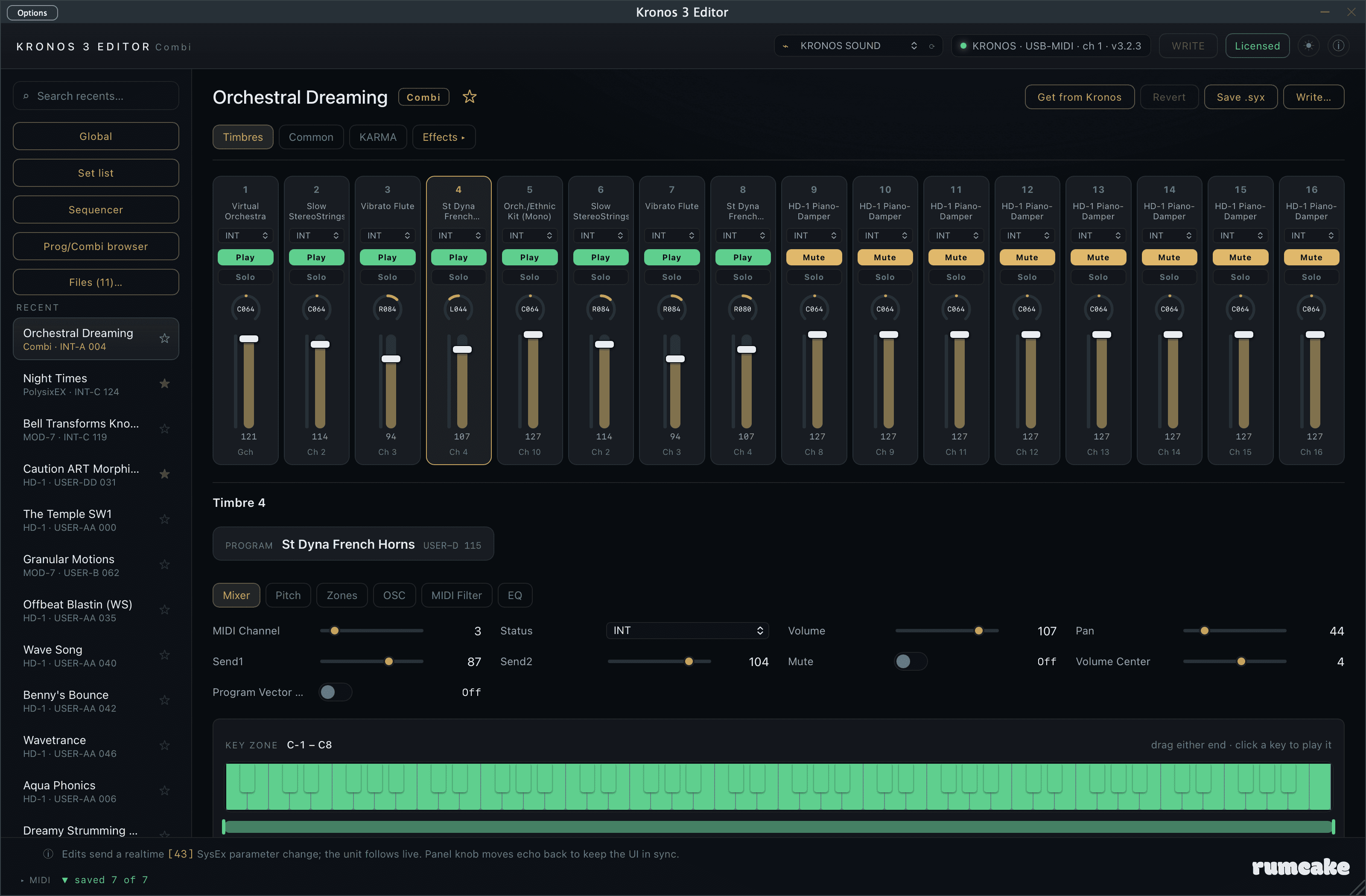
The combination editor: all 16 timbres on a mixing desk, each timbre's key and velocity zones on the keyboard, editing live on the Kronos.
New: the combination editor
Open a combination from the Prog/Combi browser and it now opens in a full editor instead of showing its name only.
A 16-channel mixer. One vertical strip per timbre, laid out like a mixing desk: the program it plays (by name), status (Internal / External / Off), Play/Mute, Solo, a pan knob with the Kronos's own readout, a volume fader, and its MIDI channel. Click a strip to edit that timbre in depth.
Solo, safely. Solo silences the other timbres on the instrument so you can hear one part alone (or solo a few). It never touches your stored Mute settings; release it and everything is back as it was.
Activity meters. Each strip has a signal indicator that lights as notes reach its timbre, following velocity, the volume fader, the timbre's key and velocity zones, and sustain-pedal tails. (It meters note activity; the Kronos does not transmit audio levels, nor the notes its own KARMA and Drum Track generate internally, over MIDI.)
An 88-note keyboard, live. The keyboard sits at the bottom: drag the two ends of a timbre's zone to set its key range, drag the bar below for its velocity range, and watch the keys light up as you play your Kronos.
Everything a timbre needs. Per timbre: the program it plays (assigned from the same Prog/Combi browser you already know), volume, pan, sends, transpose, detune, bend, delay, its key and velocity zones (with a visual map of the range that triggers it), oscillator settings, and the full per-timbre MIDI filter and track EQ.
The combi's own controls. Vector joystick and envelope, the control assignments, and the combi's scale, all on their own Common pages.
The effect chain, reused. The same 12 IFX + MFX 1/2 + TFX 1/2 editor from the sound editor, now for the combination's effects.
Live where it counts. Timbre edits move the Kronos in real time, just like the sound editor. Your changes build up a draft; the header shows when there are unsaved edits, Revert restores what is on the instrument, and a guarded Write stores the whole combination to a USER slot (with the same read-back verification as programs, so it never commits a bad write).
Also new
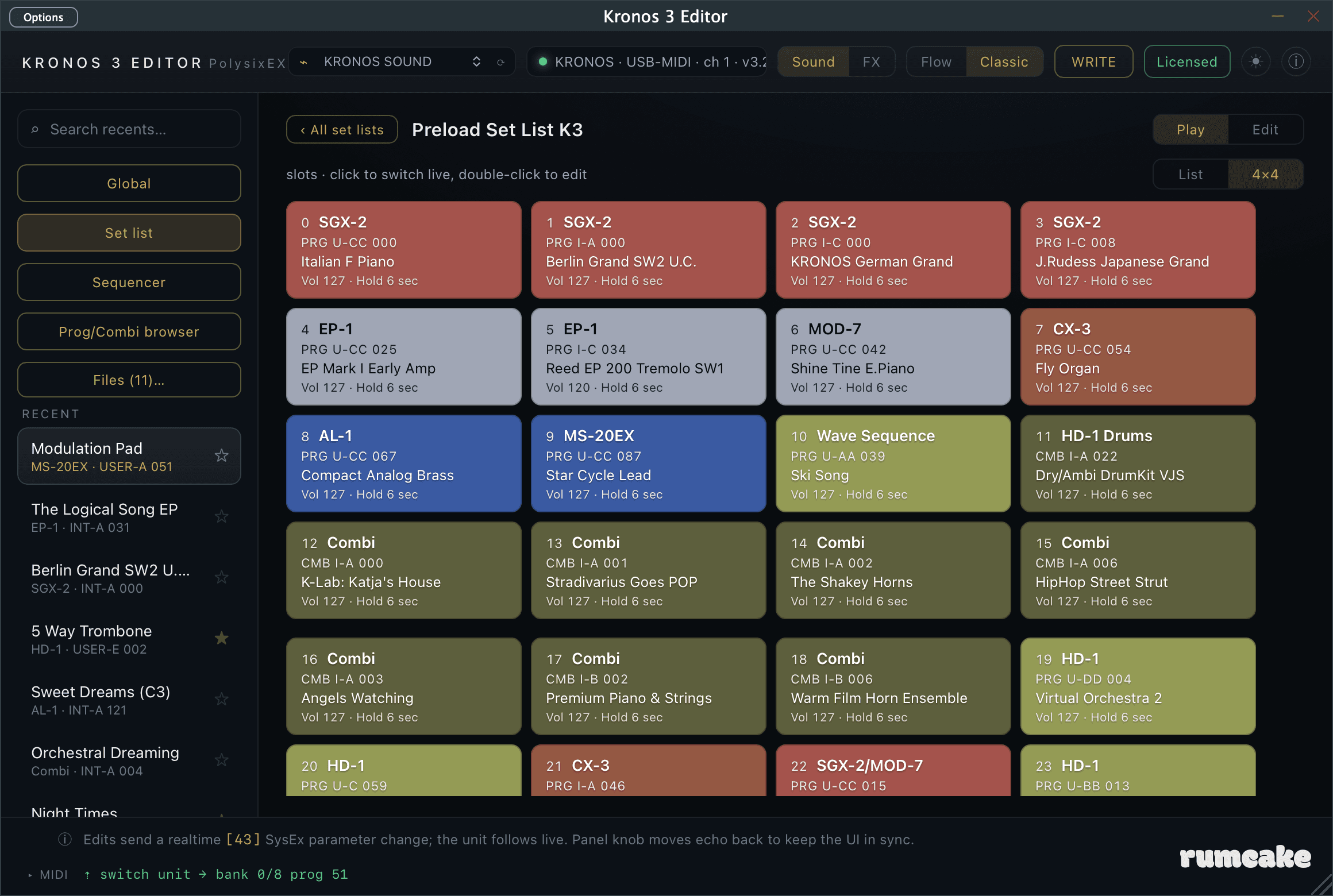
A new List / 4x4 switch shows a set list as fixed blocks of sixteen, side by side, the way the Kronos pages it. And a full light theme, throughout.
Light theme. A sun/moon button in the top bar switches the editor between dark and light. Dark stays the default; your choice becomes the default for new projects, and each project can keep its own theme (light in one, dark in another).
Live combi effects. Effect parameters and on/off in a combination now move the Kronos in real time, the same as program effects.
A better program browser. It widens with the plugin window (more sounds in view when you make it bigger) and has an X to close, alongside click-outside.
Combi files. Loading a .syx that holds a combination now opens it in the combination editor (rather than as a program).
Storing a combi now offers every slot in a USER bank (with the name of what's there), and afterwards the Kronos switches to the slot you stored to, just like writing on the instrument itself.
Set list names are shown in full on their tiles, no longer clipped.
A 4×4 set list view. A List / 4×4 switch on a set list shows its slots as fixed blocks of 16, laid side by side like paging through the set list on the Kronos. The fill-the-width list stays the default; your choice is remembered.
Recall on project open. When a DAW project loads, the plugin switches the Kronos to the sound it was saved with, so the instrument matches your session without a click. On by default; turn it off under the ⓘ menu (Settings) if you'd rather the Kronos stay on whatever's selected.
Good to know
KARMA, the Drum Track, and audio-input routing are not in this release; they are coming in a later update.
Fixes
Combination timbre Status. Choosing External (EXT) or External 2 (EXT2) for a timbre now sets the matching status on the Kronos, and combinations that use those statuses read back correctly. (In the first 1.4 build EXT had no effect and EXT2 was applied as EXT.)
v1.3.0
10 July 2026
The headline: set lists are now editable from your computer. Build and rearrange a whole show, rename and colour every slot, write comments your Kronos displays on stage, then store it back to the instrument, all without touching the panel.
The set-list editor in Edit mode: assign any sound to a slot, set its name, colour and comment, ride the 9-band EQ live, then Write the whole list back to the Kronos.
New: the set-list editor
Open any set list and switch its tab from “Play” to “Edit”.
Put any sound in any slot. Click a slot's Performance button and the Prog/Combi browser opens as a picker, with all its banks, search and category filters. One click assigns the program or combination; songs are assigned by number, with a choice of which track your keyboard plays.
Rearrange your show by dragging. Drag a slot onto another to move it, or use Cut / Copy / Paste / Insert, the same operations as the Kronos's own Edit page, with the same behaviour.
Every slot detail on one screen. Name, the panel's 16 slot colours, label size, volume, hold time, transpose, and the full 512-character comment, no page diving on the instrument.
The set-list EQ, live on faders. The 9-band graphic EQ, with input trim and bypass, moves the Kronos in real time as you drag, laid out like the panel's EQ page, alongside the list's name and control-surface setting.
Live where it counts. Move a slot's Volume, Hold time or Transpose, the EQ, the Control assign switch, or the Tempo, and the Kronos responds instantly, just like the sound editor. Assigning sounds, names, colours, comments and reordering build up a draft; the footer shows what is unsaved, Revert restores what is on the instrument, and leaving with unsaved changes always asks first. A single Write saves the whole set list, live tweaks and draft changes together.
A live tempo, too. A Tempo slider sets the instrument's tempo on the fly during a performance. (Tempo is a global, not part of the set list, so it is not saved and a slot's own program will reset it, exactly like the panel.)
A guarded write, like everything else. Write to Kronos stores the whole set list to any of the 128 slots (to its own slot, or another as a copy), verifies the instrument received it byte for byte, and only then commits it to permanent memory.
Set lists as files. Save .syx / Load .syx keep complete set lists on your computer, for backups or for moving a show between machines.
Also improved
Change an effect's type live. In the effects editor, picking a different effect for a slot now changes it on the Kronos in real time, opened at the new effect's defaults and ready to tweak. The whole effect chain, type included, is now live: build and audition effects by ear without touching the panel. (Storing a chain into a program is still done on the Kronos.)
Good to know
Live edits go to the set list the Kronos is currently on, which is the one you opened in the app. Storing needs the Kronos's Set List memory protect switched off (Global mode), and writing to the instrument requires an activated license.
Combination references in set-list slots from banks INT-G and above now show the correct bank letter (a small display fix).
v1.2.0
July 2026
The headline: a fast, live effects editor. Every program's effect chain, on all nine sound engines, now has a dedicated view built for tweaking effects by ear in real time.
The effects editor: the whole 16-slot chain on screen, with every parameter of the selected effect, all editing live on the Kronos.
New: the effects editor
Click “FX” in the top bar and the whole window becomes an effects view for the loaded program.
The whole chain at a glance. All 16 effect slots are always on screen: the 12 insert effects on one row, the two master and two total effects below, plus a Common tile, each showing the effect's name, an on/off light, and chain links. No page diving.
Tweak every effect live. Move any effect parameter, on/off, pan, bus, sends, or chain, and the Kronos responds instantly, following the panel both ways, exactly like editing a sound. It is the fastest way to dial an effect in by ear.
Effects for EXi programs, at last. Effects were previously only partially visible for HD-1 programs; now AL-1, SGX-2, CX-3, STR-1, MOD-7, MS-20EX, PolysixEX and EP-1 programs all get the effects view.
Browse 186 effects by category. A searchable browser with category filters (Dynamics, EQ, Modulation, Delay, Reverb, the dual serial and parallel combinations, and more), by name or by Korg's effect number.
Every parameter, laid out properly. The selected slot shows its routing and every parameter of the chosen effect, grouped the way Korg documents them; dual effects show one section per half. Compressors to rotary speakers, it is all there.
Shared controls in one place. The two FX LFOs, the master-effect returns and chain, and the total-effect master volume live behind a single Common tile.
Two ways in. Besides the FX button, the Flow view's FX stage shows a summary of the active chain, and the Classic view gets an “Effects” tab.
Good to know
This release is built for live tweaking. The effect sliders open at each effect's default values rather than reading a program's stored settings, and choosing which effect sits in a slot, and storing your changes, are done on the Kronos itself.
Under the hood
Fixes a long-standing quirk where one of Korg's documented effects was missing from the editor's internal tables, and repairs how some packed effect-routing settings were written.
v1.1.0
2 July 2026
The editor now covers your Combinations as well as your Programs, and finding any sound on your Kronos just got much faster.
Search and select across your Programs and Combinations in one place, filtered by category just like the hardware.
New: the Prog/Combi browser
“Browse banks” has grown into the Prog/Combi browser, one window for finding, auditioning, and switching every sound on your instrument.
Browse your Combinations. Every combination bank on the Kronos (INT-A to INT-G and USER-A to USER-G) is now browsable by name, right next to your programs. Click a combination and the Kronos switches straight to it, with the editor putting the instrument into Combi mode for you. It is the fastest way to change patches at a rehearsal or on stage.
Filter by category, just like the hardware. A row of category buttons (Keyboard, Organ, Strings, LeadSplits, BPM Sync, and the rest) shows every matching sound across all banks at once, with a second row of sub-categories (A.Piano, Real E.Piano, and so on) when you want to go finer. If you have renamed categories on your Kronos, the editor shows your names; it reads them from the instrument.
See Programs and Combinations together. The new “Both” view puts programs and combinations in a single list, so one click on a category shows everything you own in that style, each row tagged Prog or Combi.
A cleaner layout. Banks now sit in a compact rail on the left (just the letters, grouped Internal / User / GM), leaving the categories front and centre where you will use them most.
The GM banks have their own button. The read-only General MIDI banks do not carry category data, so they get a dedicated GM filter button instead.
The editor follows your hardware. Turn the dial on the Kronos in Program or Combi mode and the browser highlights the sound you land on.
Import all banks covers everything. One click reads every program and combination name from the instrument, and the button now pulses while the import is running so you can see it working.
Double-click to change and go. One click switches the Kronos to a sound and keeps the browser open for auditioning; a quick double-click switches and closes the browser in one motion.
Improvements
Combinations join your Recent list. A combination you select appears in your recents like a program does, so you can jump back to it later; the editor re-enters Combi mode on the Kronos automatically. (Combinations are not editable in this version; the editor shows them by name, view-only.)
Favorites for combinations. Star a combination in the browser or the Recent list and the Favorite flag is written back to the instrument, the same safe way program favorites are saved.
Get from Kronos understands Combi mode. Pressing it while your Kronos is on a combination now pulls that combination, not a leftover program.
Tidy your Recent list. Hover any recent row and a small ✕ appears to remove it from the list; the sound itself is untouched.
Safer favorite stars in the Recent list. A recent's star now only works on the entry you have selected, so a stray click cannot write a Favorite to a patch you were not looking at.
Fixes
Small visual polish across the browser and the footer.
v1.0.0
June 2026
First release: the full editor for all nine Kronos sound engines (HD-1 and the eight EXi engines), live editing over USB-MIDI, program librarian with bank browsing and favorites, set-list browsing and slot stepping, save/load of .syx files, and writing programs back to the instrument.
Ferro
v1.1.0
July 2026
The musicality release: the ferrofluid now writes a looping riff around the chord you hold, and the keyboard plays the super saw directly. Universal binary for Apple Silicon and Intel Macs.
New: the riff engine
Erupting spike tips are quantised onto a swung 16th-note grid and recorded into a riff that loops. The physics decides the rhythm and the energy; your chord decides the pitches.
The riff loops. Choose a 1, 2 or 4 bar loop, and set vary from a locked hypnotic riff to a line the fluid never stops rewriting.
Hold a chord, get the groove. The riff arpeggiates the notes you hold over a 1 to 3 octave range, and follows your chord changes: same rhythm, new pitches. A bass anchor holds each downbeat.
Play it like a synth. The keyboard now sounds the super saw directly, scale-snapped, with real sustain and sustain-pedal support, balanced against the groove by the new Keys control. Latch keeps everything rolling after you let go.
New presets, led by Ferrofluid Dub. Nine reworked factory presets. Ferrofluid Dub, the slow swung echo-soaked one, is the new default patch.
Improvements
Universal binary. One installer now covers Apple Silicon and Intel Macs.
Tighter timing and truer tempo sync. Notes land exactly on the grid, swing is proper MPC-style shuffle, and the echo is a true dotted eighth of the beat.
A wider, darker super saw. A stereo ensemble widener, filter key-tracking, and a tone control with real authority from dark and plucky to wide open.
Fixes
The footer controls no longer overlap the logo.
The riff no longer freezes at high vary settings.
v1.0.0
June 2026
First release: the Rosensweig ferrofluid instrument. A tempo-synced magnetic pulse erupts spikes that play a super saw, with MIDI out, nine presets, and AU / VST3 formats.